Run Claude Code With a Local Model on Your Mac
One command to turn your MacBook into a free, private AI coding agent using MLX and open-source models
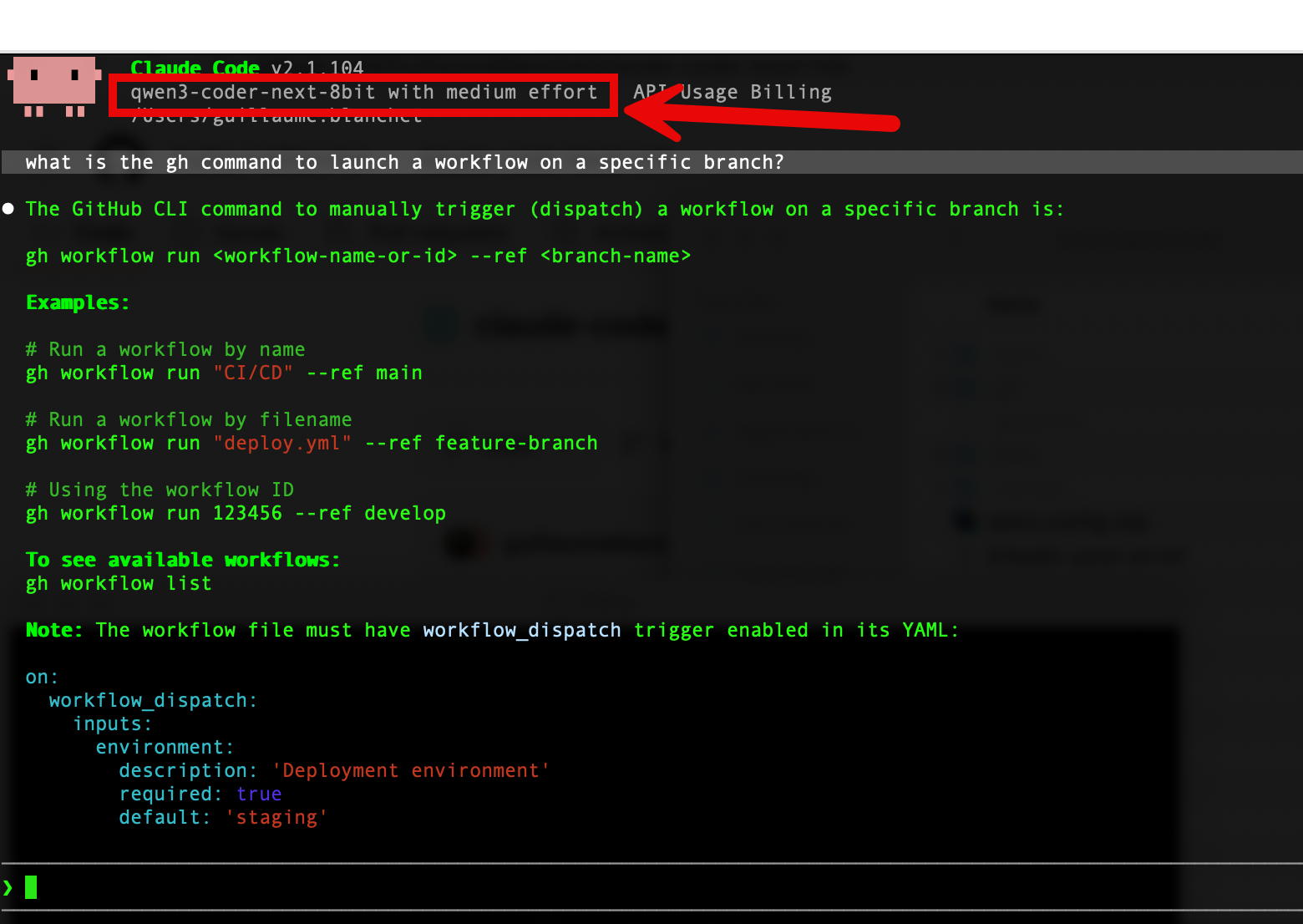
Claude Code Is Amazing. But Should It See Your Secrets?
If you’ve used Claude Code, you know it’s one of the best agentic coding tools available. It reads your codebase, edits files, runs tests, and iterates until the job is done. But every token goes through Anthropic’s API — which means your code, your environment variables, and anything the agent touches leaves your machine.
Now imagine telling it: “deploy this to production.” It will run kubectl apply, gh pr merge, terraform apply. It will read your ~/.kube/config, your AWS credentials, your .env files. All of that context goes to an external API. Are you comfortable with that?
What if you could keep the harness — the tool use, the multi-step planning, the error recovery — but swap the brain for a free, local model where nothing leaves your machine?
That’s exactly what I built: claude-code-local-mlx.
One Command, Zero Config
uv tool run --from git+https://github.com/GuillaumeBlanchet/claude-code-local-mlx.git claude-localThat’s it. On first run it:
- Clones a lightweight proxy server (claude-code-mlx-proxy)
- Downloads the model from HuggingFace (cached after the first time)
- Starts the proxy on a local port
- Launches Claude Code pointed at your local model
On subsequent runs, if the model is already loaded, it skips straight to Claude Code. No config files, no Docker, no environment variable dance.
Want it permanently installed?
uv tool install git+https://github.com/GuillaumeBlanchet/claude-code-local-mlx.git
claude-local
Why MLX and Not Ollama?
Fair question. Ollama now has native Claude Code support — you can do ollama launch claude --model qwen3.5 and it works. If you want the simplest possible setup, Ollama is a fine choice.
But this tool uses mlx-lm directly, and there are measurable reasons:
| Ollama | mlx-lm (this tool) | |
|---|---|---|
| Setup | One command | One command |
| Model format | GGUF (llama.cpp) | Native MLX safetensors |
| Inference speed | ~112 tok/s | ~130 tok/s |
| Memory overhead | Higher (HTTP + GGUF conversion) | Lower (zero-copy, in-process) |
| Model selection | Ollama registry | Any mlx-community/ model on HuggingFace |
Benchmark: Qwen3.5-35B on M4 Max. Source: antekapetanovic.com
The ~15-20% speed difference comes from eliminating the HTTP/JSON layer and using native MLX models that load directly into Apple Silicon’s unified memory with zero copy. For a coding agent making hundreds of calls per session, this compounds.
Ollama also uses GGUF models even with its MLX backend — it converts GGUF weights to MLX tensors at runtime. This tool uses native mlx-community/ models from HuggingFace with MLX-specific quantization formats (MXFP4, DWQ) that are optimized for Apple’s Metal GPU.
What Model Should I Use?
The default is mlx-community/Qwen3-Coder-Next-8bit, an 80B Mixture-of-Experts model with only 3B parameters active per token — fast and smart. But it eats 79 GB of RAM at runtime (not the 45 GB the file size suggests), so you need a 96+ GB machine.
Here’s what I recommend for each RAM tier, with real-world runtime memory and speed measured on M4 Max:
| RAM | Model | Runtime RAM | tok/s | Comparable to |
|---|---|---|---|---|
| 8 GB | Qwen2.5-Coder-3B 4-bit | ~3-4 GB | ~200 | GPT-3.5 Turbo |
| 16 GB | Qwen2.5-Coder-7B 4-bit | ~7-8 GB | ~90 | GPT-4o-mini |
| 24 GB | Gemma-4-26B-A4B 4-bit | ~17-20 GB | ~110 | GPT-4o (code gen) |
| 32 GB | Qwen2.5-Coder-32B 4-bit | ~25-30 GB | ~14-30 | GPT-4o (editing) |
| 48 GB | Qwen3-Coder-Next 4-bit | ~40-46 GB | ~40-60 | Claude Sonnet 4 |
| 64 GB | Qwen2.5-Coder-32B 8-bit | ~33 GB | ~10-14 | GPT-4o (near-lossless) |
| 96 GB | Qwen3-Coder-Next 8-bit | ~79 GB | ~35-50 | Claude Sonnet 4 |
| 128 GB | Devstral-2-123B 4-bit | ~72-90 GB | ~5-8 | GPT-4.1 |
To use a different model:
claude-local -m mlx-community/Qwen2.5-Coder-32B-Instruct-4bitA Warning About RAM Estimates
Don’t trust “model file size” as your RAM estimate. The on-disk weights are just part of the picture. At runtime, the KV cache (which grows with context length), tokenizer, and framework overhead can add 50-80% on top. I learned this the hard way when Qwen3-Coder-Next-8bit (45 GB on disk) consumed 79 GB of actual RAM on my M4 Max.
The Harness Boost: Why Benchmarks Undersell Your Local Model
Here’s the thing most people miss: coding benchmarks (Aider, SWE-bench, HumanEval) test models with basic scaffolding — a simple loop of “read prompt, generate code, check.” Claude Code is far more sophisticated: it has tool use, iterative file editing, shell access, multi-step planning, and error recovery.
Research shows the harness matters more than the model at the frontier:
| Study | Basic scaffold | Optimized scaffold | Gain |
|---|---|---|---|
| Claude Opus 4.5 on CORE-Bench | 42% | 78% (with Claude Code) | +36 pts |
| LangChain coding agent | 52.8% | 66.5% | +14 pts |
| SWE-bench Pro | ~1 pt from model swaps | ~22 pts from scaffold swaps | Scaffold >> Model |
Source: Particula
So a Qwen2.5-Coder-32B that benchmarks like GPT-4o in isolation? With Claude Code’s agentic harness, it can perform closer to Claude Sonnet 4 in practice. The model provides the intelligence; the harness multiplies it.
How It Works Under the Hood
Claude Code  ──  Anthropic Messages API  ──>  mlx-proxy  ──  MLX inference  ──>  Local Model
  (CLI)      <──     /v1/messages        ──  (port 18808) <──    tokens     ──  (Apple GPU)
Claude Code requires the Anthropic Messages API (/v1/messages). Local models don’t speak this protocol. The proxy (claude-code-mlx-proxy) bridges this gap: it accepts Anthropic-format requests, translates them into MLX model calls, and streams responses back in the expected format.
The tool handles the full lifecycle:
- Clones the proxy repo to
~/.local/share/claude-local/proxy/ - Upgrades dependencies (the upstream repo sometimes pins old versions of
mlx-lmthat don’t support newer model architectures) - Patches the proxy to accept Claude Code’s
"adaptive"thinking mode - Starts the proxy, waits for the health endpoint, then execs into Claude Code with the right environment variables
- Reuses an existing proxy if it’s already healthy (no model reload on subsequent launches)
Practical Tips
Kill the proxy when you’re done:
claude-local --killForce restart (e.g., to switch models):
claude-local --restart -m mlx-community/Gemma-4-26b-a4b-it-4bitProxy-only mode (if you want to use Claude Code separately):
claude-local --server
# Then in another terminal:
ANTHROPIC_BASE_URL=http://127.0.0.1:18808 claude
Check logs if something breaks:
cat ~/.local/state/claude-mlx-proxy.logThe Killer Use Case: DevOps Without Leaking Secrets
This is the use case that convinced me to build this tool.
When Claude Code runs a kubectl get pods, a gh pr create, or a terraform plan, the full output — including cluster names, namespaces, resource configurations, and error messages — gets sent to the API as context. When it reads your .env to understand a deployment, your database URLs, API keys, and cloud credentials are in the conversation. When it shells into your staging environment, the session output crosses the wire.
With a local model, none of this leaves your machine. The model runs on your GPU, the proxy runs on localhost, and your secrets stay in your RAM. You can let the agent kubectl apply -f deployment.yaml without worrying about what context it’s shipping to a third-party server.
And here’s the thing: you don’t need GPT-5-class intelligence for DevOps tasks. Running gh pr merge, kubectl rollout restart, or docker compose up doesn’t require deep reasoning. A 7B model can follow instructions, read command output, and retry on errors. Even the smallest models on the table above can handle:
ghworkflows — creating PRs, merging, reviewing checkskubectloperations — deploying, scaling, checking pod status, reading logsdocker compose— starting services, checking health, rebuildingterraform/tofu— planning, applying, reading state- CI/CD debugging — reading build logs, fixing YAML, retrying pipelines
For these tasks, you don’t need frontier-model intelligence. An 80B Qwen3-Coder-Next running locally on a 96 GB Mac delivers Claude Sonnet 4-class performance at ~40 tok/s — and on a tighter budget, even a 32B model on a 32 GB MacBook Pro handles DevOps workflows well. Either way, infinitely more secure than sending your cloud credentials through an external API.
The Security Argument in One Sentence
If your AI agent can
kubectl execinto your production cluster, you probably don’t want its brain hosted by a third party.
Conclusion
Running Claude Code with a local model isn’t just about saving money — it’s about security. Your secrets, your cloud credentials, your infrastructure state — none of it needs to leave your machine for an AI agent to be useful.
The model quality gap is closing fast. A well-harnessed Qwen3-Coder-Next on a MacBook Pro performs in the same league as commercial models that cost hundreds of dollars per month. And with Apple Silicon’s unified memory giving MLX a structural advantage, your Mac is quietly becoming one of the best AI development machines you can buy.
Try it:
uv tool run --from git+https://github.com/GuillaumeBlanchet/claude-code-local-mlx.git claude-localThe repo is at github.com/GuillaumeBlanchet/claude-code-local-mlx. PRs welcome.