Production Voice AI Agents: 8 Lessons on Winning Latency Without Losing Intelligence
In voice AI, two seconds of dead air breaks the call — and almost every millisecond you shave off costs you reasoning power. Eight industry-standard architectural patterns covering WebRTC, pipeline choice, the thinking tax, prompt optimization, preemptive generation, async workers, compaction, and warmed fallbacks.
Why Voice Is Far Less Forgiving Than Text
Caller: “Can I move my appointment to Thursday morning?” (1.2 seconds of silence) Caller: “Hello? Are you still—” Agent: “Sure, let me check Thu—” (The agent hears the interruption, cancels its reply, and falls silent again. Click.)
In a text chat, two seconds of latency barely registers. A bouncing typing indicator buys you all the patience in the world. On a phone call, that exact same pause feels like a dropped line. Past half a second to a second of dead air, people instinctively test the connection, talk over the first syllable your model just generated, trigger a barge-in loop, and hang up.
Fight for those milliseconds, though, and you immediately run into the central tension of voice AI: almost every latency optimization costs you raw intelligence.
What follows are 8 core architectural lessons—ordered roughly from the network wire all the way to minute twenty of a messy production call—on how to stay fast without turning your agent into a brittle script.
1. Start With the Wire: WebRTC on the Last Mile, WebSockets in the Datacenter
Most AI vendor quickstarts wire a browser straight to a model endpoint over WebSockets. It works beautifully on office fiber. Then a real caller steps into an elevator on spotty 4G, and the audio turns to soup.
Head-of-Line blocking stalls the whole stream waiting for retransmission.
Lost frame is concealed (PLC); remaining audio plays without stalling.
The fix is a transport split emphasized throughout Voice AI & Voice Agents: An Illustrated Primer and both the Pipecat and LiveKit docs:
- Use WebRTC on the last mile (caller device ↔ media server). Cellular networks and crowded Wi-Fi drop packets constantly. Because WebSockets run over TCP, a single lost packet forces retransmission and triggers head-of-line blocking: every audio frame behind it freezes in line until the missing packet arrives, creating jarring stutters and catch-up bursts. WebRTC sends media over UDP (
RTP/SRTP) instead, dropping or concealing late frames so the conversation never stalls. As a bonus, you get adaptive jitter buffers, Opus speech compression, browser-native acoustic echo cancellation (AEC) and noise suppression, and NAT traversal (ICE/STUN/TURN) out of the box. - Keep WebSockets on the server leg (orchestrator ↔ model APIs). Once audio lands inside your cloud infrastructure, traffic between your backend and STT, LLM, or TTS providers travels over clean datacenter networks with near-zero packet loss. Here, TCP behaves reliably and WebSockets stay simple and fast.
2. Pick Your Pipeline: Speech-to-Speech or STT → LLM → TTS?
The first time you hear a native speech-to-speech model like OpenAI Realtime (gpt-realtime) or Gemini Live, it feels like the future. The prosody, laughter, pacing, and low raw latency are remarkably human.
Move beyond open-ended chitchat, however, and their sweet spot narrows fast. When a call carries real business logic—a clinical triage nurse, a structured HR interviewer, or a regulated support workflow—end-to-end audio models still trail dedicated text LLMs on strict instruction following, deterministic state transitions, and repeatable evals.
| Dimension | Speech-to-Speech (Realtime / Gemini Live) | Pipeline (STT → LLM → TTS) |
|---|---|---|
| Prosody & tone | Native audio expressiveness | Very good with streaming TTS |
| Raw latency | Lowest baseline | Fast with streaming + preemptive turns |
| Complex business logic | Limited on strict multi-step rules | Full frontier / fast text LLM control |
| Evals & metaprompting | Harder to debug and optimize | Full transcript visibility & prompt evals |
| Best fit | Simple reception, FAQs, light chat | Triage nurse, HR interviewer, regulated workflows |
"I want to book January 18… [600 ms pause] …wait no, February 18."
For anything rule-heavy, default to a modular STT → LLM → TTS pipeline. You keep your pick of the fastest text LLMs and clean transcript-based testing, and you unlock one of the biggest UX upgrades in modern voice AI: semantic turn detection (such as LiveKit’s Turn Detector or Pipecat’s Smart Turn).
Naive silence detection (VAD) cuts callers off the instant they pause to think. A semantic turn detector evaluates the live transcript and speech cues to tell the difference between “Uhh, let me check my calendar…” and “That’s all I needed, thanks.”
3. Pick a Fast Model, Then Pay the “Thinking Tax”
When benchmarking LLMs for voice, two speed numbers matter very differently:
- Time to First Token (TTFT) dominates perceived speed. It decides how long the caller waits before hearing the very first word.
- Output throughput (tokens/sec) only needs to stay comfortably ahead of spoken delivery and streaming TTS so audio never stalls mid-sentence.
The catch is easy to miss if you only look at headline leaderboards. Head over to Artificial Analysis and toggle “thinking effort” down to low (or turn reasoning off altogether) to see what a model actually delivers when you strip away its time to think.
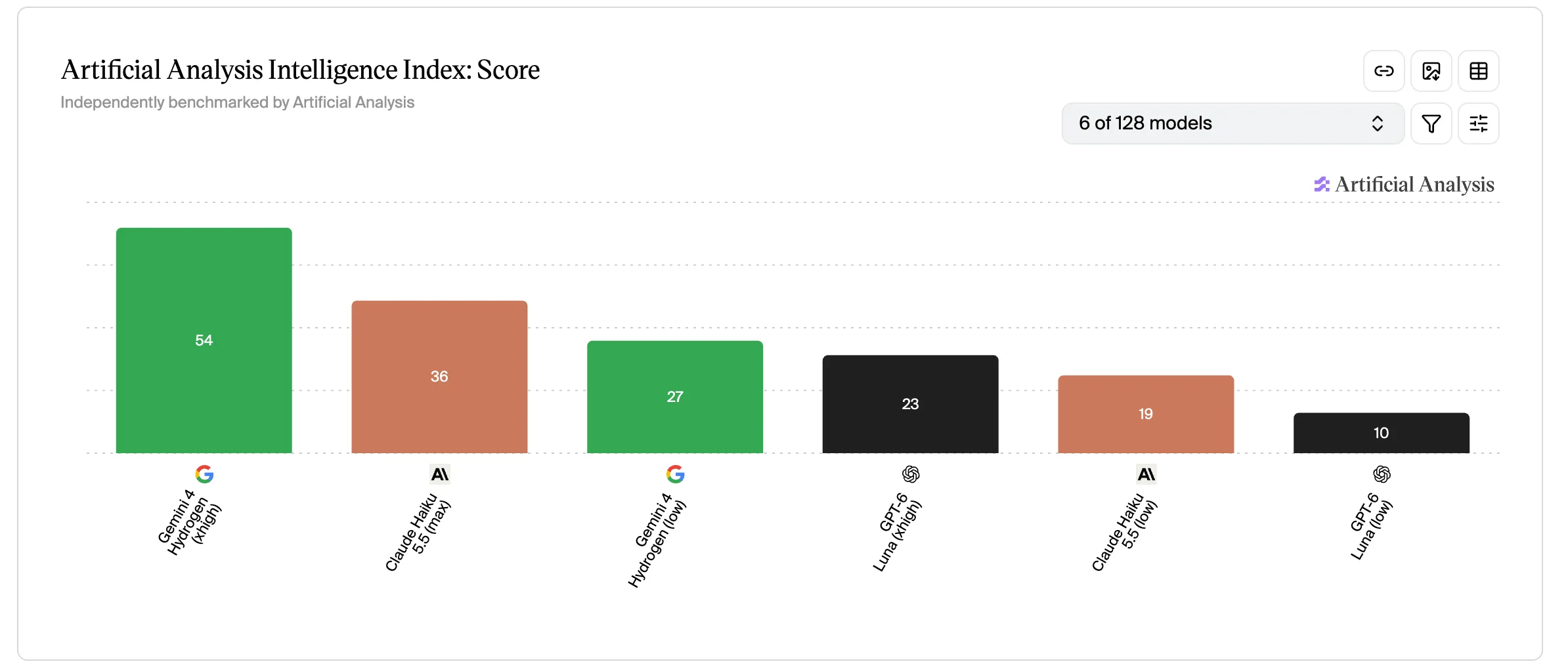
Cutting thinking effort to hit real-time latency cuts intelligence scores roughly in half. In practice, you just stepped six to twelve months backward in raw reasoning capability.
4. Buy That Intelligence Back With Prompt Optimization
Once you turn thinking down to protect TTFT, your model no longer has a hidden chain of thought to rescue vague instructions at runtime. Ambiguities that a reasoning model quietly untangles turn into missed constraints and awkward replies.
Consider the difference in a booking flow:
Vague (a reasoning model figures it out): “Be helpful when rescheduling, check clinic rules, and don’t double-book.” Explicit (what a low-thinking model needs): “Before confirming a new slot, verify (1) the caller gave a date and time window, and (2) the slot appears in
available_slots. If either is missing, ask one short clarifying question instead of guessing.”
Because the model can no longer think at inference time, your prompt has to do that thinking ahead of time. Treat prompt optimization as real engineering work:
- Build evaluation suites (evals) straight from ugly real-world transcripts: hesitations, mid-sentence corrections, background noise, and conflicting business rules.
- Use metaprompting and automated prompt optimizers—like
MetaPromptOptimizerandGepaPromptOptimizerin MLflow GenAI—to harden your system prompt systematically against those failure cases instead of guessing by hand.
5. Shave the Turn With Preemptive Generation (Without Side Effects)
Even with a fast model and a sharp prompt, waiting for final silence detection before firing your LLM call leaves hundreds of milliseconds on the table.
Preemptive generation closes that gap by starting inference on partial streaming transcripts before the caller finishes speaking. If they end the sentence where they seemed headed, your first token is already waiting in the wings.
The catch is human nature. People change their minds mid-sentence all the time:
“I want to book January 18th, uh… actually make that February 18th.”
Whenever the confirmed transcript diverges from your speculative draft, you must cleanly discard the stale generation and re-run against the final utterance. More importantly, enforce one ironclad rule: never let a speculative pass trigger irreversible side effects. Speculate on phrasing and safe read-only lookups all you want, but never confirm a booking, mutate a database, or charge a card until the turn is final.
6. Keep the Speaking Agent Off the Tool-Calling Path
One of the fastest ways to ruin a voice call is letting the conversational LLM run tool calls itself (CRM lookups, calendar checks, database queries).
In a single-agent loop, every tool call traps the caller behind two full LLM round-trips plus external API latency, all in dead silence. Turn one decides which tool to call; then your backend waits on the network; then turn two finally generates the words to speak.
Blocking single agent
2 LLM round-trips + API wait in dead silence
Decoupled orchestrator
Voice stays responsive while tools run in parallel
The cleaner pattern—formalized in Google DeepMind’s Talker-Reasoner architecture and supported by Pipecat (non-blocking async function calling and ParallelPipeline) and LiveKit Agents—splits the job around an orchestrator:
- The speaking agent owns the critical path and calls zero tools. It stays light, fast, and focused entirely on tone, turn-taking, and keeping the conversation natural.
- Parallel worker agents handle slow work off-thread. The orchestrator dispatches them in the background while the call continues and merges their results into shared context as soon as they land.
Watching multi-agent orchestration live
Once an orchestrator owns that background lane, you don’t have to stop at one worker. On a single turn during a clinical triage call, the speaking agent keeps the conversation moving while the orchestrator fans out in parallel to a tool-calling worker (CRM/calendar), a diagnostic worker (symptom red flags), and a research worker (internal protocols):
"I've had a fever since yesterday and need an appointment tomorrow morning."
"Got it, noting your fever. One moment while I check slots and guidelines…"
check_slots("tomorrow_am") eval_symptoms(fever=24h) search_kb("fever_protocol") 3. Tool Calling, Diagnostic, and Research run concurrently without blocking the voice channel.
7. Survive Minute Twenty With Async Context Compaction
A two-minute demo almost never breaks your context window. A twenty-minute production call will.
Every back-and-forth exchange, false start, and tool payload piles up in the conversation history. Left alone, that growing transcript hurts you twice: TTFT creeps upward on every turn (and any cache miss becomes far more expensive), while fast low-thinking models gradually lose track of the system rules buried at the top of the prompt.
Summarizing older turns sounds like an easy fix until you run it synchronously—pausing a live call for a second or two to summarize history recreates the exact dead air you just engineered away.
The answer is asynchronous context compaction, popularized early by Pipecat creator Kwindla Hultman Kramer (notably on The TWIML AI Podcast #739: “Building Voice AI Agents That Don’t Suck”) and built into Pipecat’s auto-context summarization:
- Compact off the critical path. When the conversation crosses a token budget or a threshold of unsummarized turns, kick off a summarization job on a background worker without blocking the live audio loop.
- Swap the history cleanly without losing the thread. Rebuild the message array as
[System Prompt] + [Compact Summary of Older Turns] + [Recent Verbatim Turns]. Pinning the system prompt and keeping the latest exchange (plus any active tool calls) verbatim ensures the caller never feels a seam.
Minute twenty stays just as snappy and disciplined as minute one.
8. Survive a Bad Day: Tame Your Fallback and Avoid the Cold Cache Trap
Sooner or later, your primary model provider will have a rough afternoon: drifting latency, rate limits, or a partial outage. Adding a fallback model (like LiveKit’s FallbackAdapter) looks straightforward on an architecture diagram. In live voice, a naive failover often makes the call worse at the exact moment it kicks in.
Picture the five-second domino collapse:
- Detection delay: your orchestrator waits before concluding the primary model isn’t coming back in time.
- A cold cache miss: failover fires mid-call, handing the backup model your full system prompt and entire conversation history for the very first time. Its KV / prompt cache is completely empty.
- The reset loop: re-prefilling the entire conversation from scratch spikes TTFT. Dead air stretches past two seconds. The caller says “Hello?”, cancels the generation, and forces the whole cycle to start over.
- Primary stalls Timeout
- Failure detection Dead air
- Cold cache miss Full history re-prefill
- "Hello?" User interrupts → reset
- p95 latency drift Early signal
- Warm backup cache Prefix cached in background
- Seamless handoff Low TTFT + audio cue
Don’t wait for a hard timeout to introduce your backup model to the conversation. Watch early degradation signals like p95 latency drift and pre-warm your fallback model in the background whenever the primary starts slipping, so the conversation prefix is already cached before failover actually happens.
Bonus: Make Waiting Audible on Phone Calls—and Visible on Desktop
Even with a tight architecture, some moments simply take time: a third-party lookup, an orchestrator handoff, or transferring to a specialist agent.
In voice, perceived latency matters just as much as actual latency. An unexplained one-second gap feels three times longer than an announced two-second wait—and your playbook should adapt to the caller’s device:
- On a phone call (audio only): voice is your only channel. Give a brief, natural spoken cue before a slow lookup (“Got it, checking availability right now…”), and announce handoffs explicitly (“Connecting you with our billing specialist now”).
- On desktop or web (audio + screen): never leave someone staring at a static microphone icon while three background workers do heavy lifting. Stream live state over your event channel (WebRTC DataChannel or WebSockets):
- Show real pipeline states: distinguish Listening, Transcribing, Checking calendar, Searching protocols, and Responding.
- Stream live transcripts: seeing their own words appear immediately reassures users that they were heard accurately, even before the first synthesized syllable plays.
- Surface active workers: display a quiet status chip showing which tool or specialist holds the turn instead of a generic spinner.
Production Readiness Checklist
| Area | Architecture rule | Failure avoided |
|---|---|---|
| Network | WebRTC (UDP/Opus/AEC) on last mile, WebSockets server-side | TCP head-of-line blocking on mobile/Wi-Fi |
| Pipeline | STT → LLM → TTS + semantic trigger for complex rules | Fluent speech-to-speech agents breaking business logic |
| Model | Benchmark at thinking = low/off and prioritize TTFT | Slow voice starts or optimizing the wrong metric |
| Prompts | Metaprompting + evals on real failure scenarios | Dropped tool calls once runtime thinking is off |
| Preemptive | Start early on partials, zero speculative writes | Booking or mutating state on a self-corrected turn |
| Tools | Isolate tool calls inside async parallel workers | Two blocking LLM round-trips before speaking |
| Context | Compact older turns asynchronously in the background | Rising TTFT and instruction drift on long calls |
| Fallback | Track p95 drift and pre-warm backup model context | Cold KV cache miss + user barge-in loop |
| Voice UX | Speak status cues on calls; stream live state, transcripts & tool activity on desktop UI | "Hello?" interruptions, frozen-UI confusion, and premature hang-ups |
The goal of all eight patterns is simple: when your caller asks to move their Thursday appointment, they never have to ask “Hello? Are you still there?”—and your agent never has to trade away its judgment just to answer in time.
References & Further Reading
- Kwindla Hultman Kramer (Daily / Pipecat) — Voice AI & Voice Agents: An Illustrated Primer (latency budgets, WebRTC vs. WebSockets, turn detection, function calling, cascaded vs. speech-to-speech pipelines) and The TWIML AI Podcast #739: “Building Voice AI Agents That Don’t Suck” (orchestration, modular stacks, and async context compaction).
- Pipecat Documentation — docs.pipecat.ai (WebRTC/WebSocket transports, async function calling,
ParallelPipeline, Smart Turn detection, and auto-context summarization). - LiveKit Agents Documentation — docs.livekit.io/agents/ (preemptive generation,
FallbackAdapter, Turn Detector, agent UI states, and WebRTC DataChannels). - Google DeepMind (2024) — Agents Thinking Fast and Slow: A Talker-Reasoner Architecture (splitting the fast speaking agent from asynchronous background reasoning and tool execution).
- Artificial Analysis — artificialanalysis.ai (TTFT, throughput, and Intelligence Index benchmarks across reasoning/thinking effort levels).
- MLflow GenAI — mlflow.org/docs/latest/genai/ (evaluation suites and prompt optimization via
MetaPromptOptimizerandGepaPromptOptimizer).